
Millions of people in the UK could get faster or cheaper broadband. Use this guide to help you choose the right broadband package for your home.
Four simple steps to choosing your broadband
- Check what broadband you can get
- Choose the broadband speed you need
- Compare deals
- Sign up and switch with One Touch Switch
Worried about the cost of broadband?
If you receive certain benefits, such as Universal Credit or Pension Credit, you might qualify for a social tariff. This is a cheaper broadband or phone deal, with no mid-contract price rises, for people on lower incomes. Check our social tariff guide.
Check what broadband you can get
Use Ofcom’s free checker to see what types of broadband – and the fastest speeds – you can get at your address.
Can’t get a decent fibre or cable connection where you live? You could also look at broadband services using 5G mobile data or a satellite connection.
Types of broadband
If a service is described as using fibre, check whether it means full-fibre or part-fibre.
Full fibre
Full fibre is the newest type of wired broadband. Fibre optic cables run all the way to your home, so it usually gives faster and more reliable speeds. This is also called fibre-to-the-premises, or FTTP.
Cable
Cable broadband services can also deliver high speeds, usually using fibre optic cables to your local area and coaxial cable to your home.
Part fibre
This is a slightly older technology. Fibre cables run to a street cabinet, then copper wires carry the signal the rest of the way to your home. It is also called fibre-to-the-cabinet, or FTTC.
5G mobile broadband, satellite and fixed wireless access (FWA)
These are types of broadband that use wireless signals instead of a cable to your home. They can be useful if your wired broadband options are limited, but speeds and reliability can change depending on where you live.
Choose the speed you need
Different homes need different broadband speeds. You will usually see broadband speeds advertised in megabits per second (Mbit/s). The higher the number, the faster the connection.
- Standard broadband: up to 30 Mbit/s – enough for basic browsing, email and standard video.
- Superfast broadband: 30 to 300 Mbit/s – suits most everyday use, such as working from home, video calls and streaming.
- Ultrafast broadband: 300 Mbit/s or more – better if several people are online at once, or you stream a lot of video content, play games online or download large files.
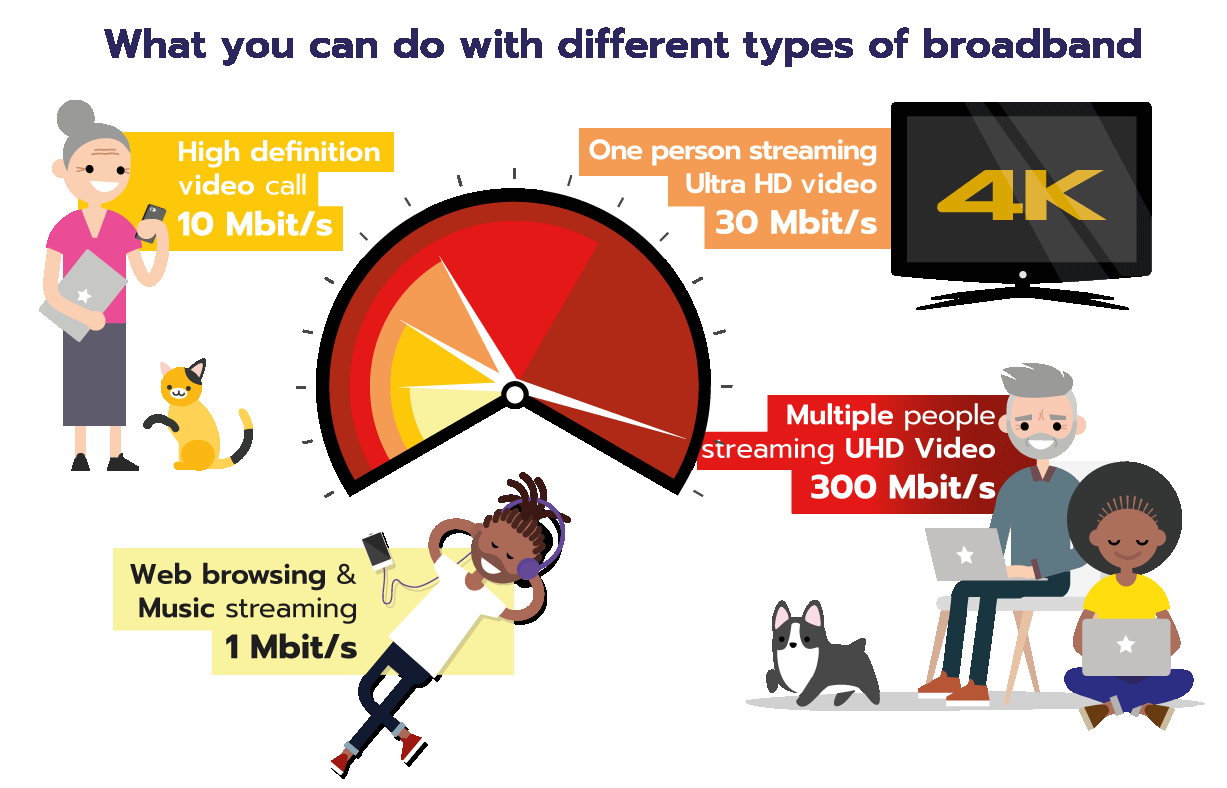
As a rough guide, here is what different speeds let you do:
Not getting the speed you paid for?
You should always get clear information about broadband speeds when you sign up. Check out our guide on what to do if you are not getting the speed you were promised.
Compare deals
Compare a few deals side by side, once you know what types of service you can get and the speed you need. Price comparison websites can help you weigh up your options.
Don’t just look at the monthly price on its own. These things matter too:
You can also check our money-saving guide for ways to save, such as bundling your phone or TV service with your broadband.
Sign up and switch with One Touch Switch
Contact the provider you want to join when you have found the right deal. They can manage the switch for you using One Touch Switch. You shouldn’t need to speak to your old provider to cancel.
You’ll automatically receive information from your old provider explaining the implications of switching for you, such as whether you have any early termination fees or whether you need to return your old router.
Your cooling-off period
If you sign up online, on the doorstep, or over the phone, you can change your mind and cancel within 14 days. This might not apply if you sign up in store.
Before you sign up, check:
- which type of connection you are getting (full fibre or part fibre)
- the total cost over the whole contract
- whether the price can go up, when and by how much
- the speed you need for your home
- how long the contract lasts
- the cost of leaving the contract early
Related content