
The networks that our phones and broadband services rely on are important. They allow us to keep in contact with friends and family, work, contact essential services, and carry out financial and other day to day transactions.
Severe weather such as storms, flooding, and extreme heat can affect the networks used by our phone and broadband services, causing power cuts and service outages. Extreme heat and floods can damage mobile masts and broadband networks, and undersea internet and phone cables might be damaged.
The impact of severe weather on phone and broadband services can also be different depending on where you live, with rural areas more likely to be affected.
- How to prepare for severe weather events
- What to do during severe weather events
- What to do if you have a problem caused by severe weather events
How to prepare for severe weather events:
Phone and broadband service providers are required to take steps to make sure we can rely on them, including during severe weather events. However, even where they do this, it’s possible that their networks could still be affected by severe weather events. There are things you can do to prepare for severe weather and other related emergencies, whether you’re a domestic or small business customer.
Make sure your devices have enough charge: Charge your devices before the beginning of any extreme weather event that the Met Office warns us about. A battery power bank can recharge your devices if the severe weather lasts for a long time.
Make sure pay-as-you go devices have credit: If you have pay-as-you go devices, check they have enough credit to make calls and send messages. Calling 999 or 112 is always free and will work even if you don’t have any credit.
Set up emergency contacts and enable safety and emergency features on phones: Add ‘in case of emergency’ (ICE) contacts that can be easily found on your phone. Enable any safety and emergency features such as the ‘personal safety’ feature on Android and the ‘Health’ app on iOS. These allow emergency services and first responders to quickly view important information and contact your emergency contacts without unlocking your phone.
Write down important phone numbers: Make a pen-and-paper list of important phone numbers, including utility providers and your broadband and mobile service providers, and keep these in a safe and memorable place.
Check local council advice: Your local council might provide contact information for local services and utilities in your area during an emergency. Check their website and write down important advice and contact information. You can find your local council on the UK Government’s website.
Your local council might also provide information on public spaces, such as libraries or community hubs, which might provide assistance with charging devices and additional support.
Create an emergency plan with friends and family and find support from neighbours: Make plans with your friends and family on how to keep in contact if there are outages. For example, agree to visit elderly relatives if it is safe to do so especially if you haven’t heard from them for some time.
In emergency situations, your neighbours might be the best placed to help you. Discuss with your neighbours how you can support each other.
Use a battery-powered, wind-up or solar radio: AM/FM/DAB radios will help you receive weather warnings, news updates and information from your local authority or the UK Government. Information might also be provided through the UK Government’s emergency alert system if mobile networks are available.
Consider a battery backup power solution for your home broadband: Your home broadband services, including any digital landline, will not work during a power cut unless you have an additional power source.
Tell your provider if you rely on your landline and if you don’t have a working mobile phone or reliable mobile signal. Digital landlines need mains electricity and will not work in a power cut unless you have a battery back-up.
If you depend on your landline, your provider must make sure you can contact the emergency services during a power cut. If you don’t have a working mobile phone or a reliable mobile signal, your landline provider must offer you a free solution such as a battery back-up unit. This back-up must last for at least one hour in a power cut, but some providers have back-ups that last up to seven hours.
For most people, a mobile phone is a practical alternative if the power goes out. Even if you have no signal on your usual mobile network, calling 999 will automatically connect through another network if one is available.
If you are not eligible for a free back-up solution you can purchase one from your provider or from a retailer.
Tell your phone and broadband provider if you are vulnerable: If you are a vulnerable customer (for example elderly, or with additional needs) and your phone and broadband provider is aware of this, they should provide extra support.
Telecare users: If you use a telecare device contact your phone and broadband provider so that you get the right support.
Consider having members of your household subscribe to different providers: Different mobile networks might be affected differently by severe weather events. By having access to multiple providers within a household there’s a greater chance that at least one service may be available. You could also use an eSIM (if your phone can support this) to have access to two providers on one device. Be aware that having multiple providers as an individual and as a household might mean additional cost.
If your broadband often goes down, you might want to consider satellite internet as a backup, especially if you live in a rural or remote area.
Check your government’s website: More information on how to prepare for emergencies has been developed by the UK, Scottish, Welsh and Northern Irish Governments.
UK Government: https://beready.campaign.gov.uk
Scottish Government: https://ready.campaign.gov.scot/
Welsh Government: https://www.gov.wales/how-prepare-emergencies
Northern Irish Government: https://www.nidirect.gov.uk/campaigns/be-ready-emergencies
What to do during severe weather events:
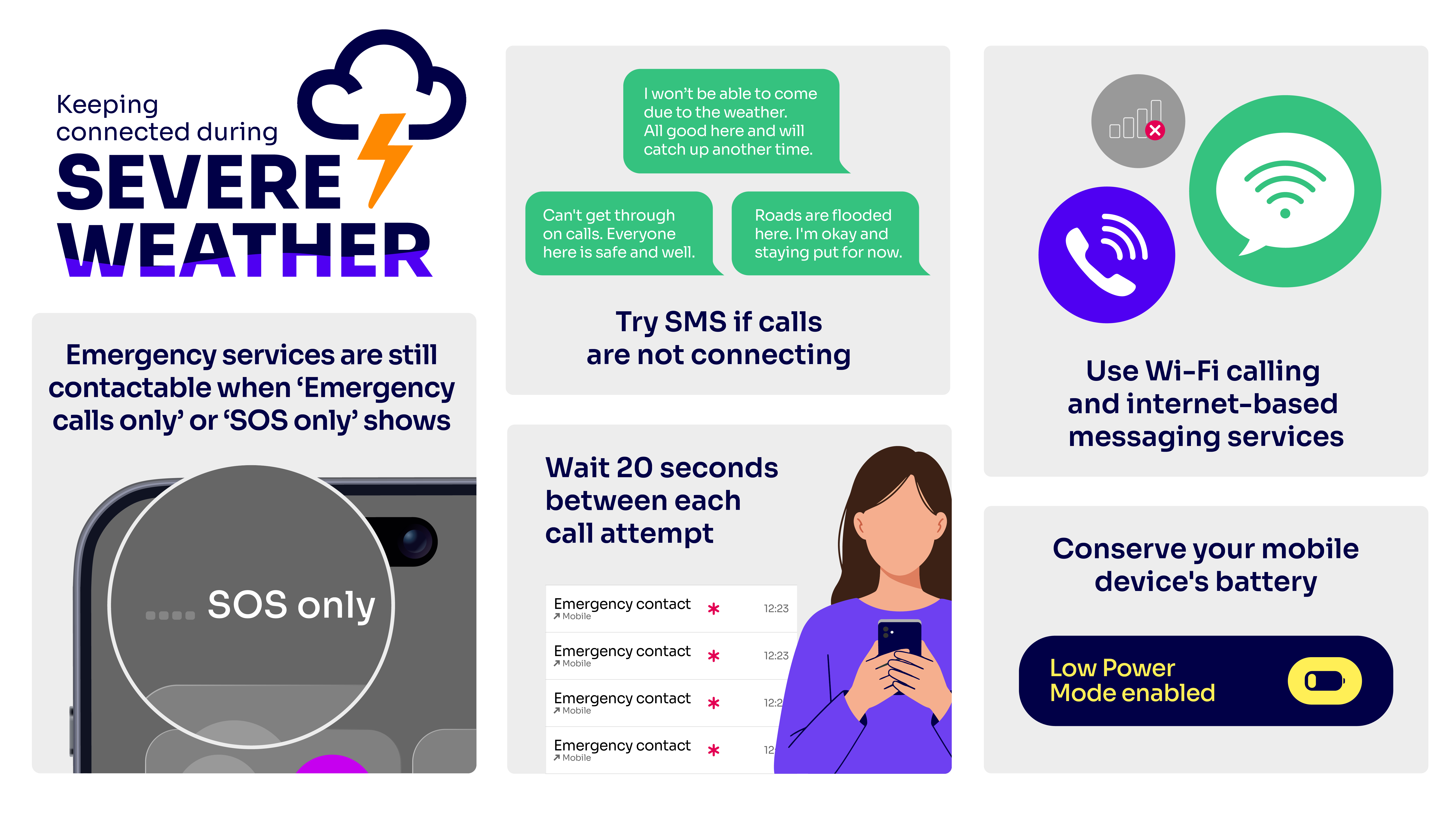
Contacting emergency services: If your mobile provider is experiencing an outage, you will be able to automatically use another provider’s network to call 999 or 112 free of charge. This is displayed as ‘emergency calls only’ on Android or ‘SOS only’ on iOS.
Some mobile devices can use Emergency SOS (iOS) and Satellite SOS (Android) to contact emergency services via satellite if no mobile networks are available.
Try texts if calls are not connecting: If your phone is showing that it has signal, but phone calls are not connecting, try sending a standard text (SMS) message. You can turn this on automatically by selecting ‘automatically resend as a text (SMS/MMS)’ within ‘Google messages’ settings on Android, or under ‘messaging’ in iOS settings. These messages might still get through even if the mobile network is extremely busy. By using text messages, you will also help to reduce the pressure on the mobile network. Charges may apply for standard texts.
Wait for 20 seconds between each attempt to make a call: Mobile networks might be extremely busy and unable to connect phone calls. Multiple call attempts in a short period of time can increase pressure on the network. By waiting between attempts, it is more likely that your call will connect.
Use Wi-Fi calling and internet-based messaging services: Turn on Wi-Fi calling in your settings on your mobile device to allow calls over your broadband connection if your mobile network is unavailable. Messaging services allow you to make and receive calls and messages over your broadband connection. These include WhatsApp, Messenger, iMessage and Signal.
Save your mobile battery: Try to save your mobile battery as much as possible so it can still be used in emergencies. To do this you can do things like lowering your screen brightness and turning on battery saver mode. More battery saving advice can be found on the Google Android website and the Apple iOS website.
What to do if you have a problem caused by severe
weather events:
Report outages to your provider: If your mobile, broadband or landline is unavailable after a severe weather event, report this to your provider if you can. This helps make sure that any faults are fixed as soon as possible. Most providers offer several ways to contact them including by phone, online, through a ‘live chat’ function or a service app.
Check if you’re entitled to compensation: If your provider has signed up to Ofcom’s automatic compensation scheme, and your broadband or landline isn’t fixed within two working days, you might be entitled to compensation.
If your provider has not signed up to the scheme, or if you are having issues with your mobile service, you might still be entitled to compensation.
If you are unhappy with how long it takes for your service to be fixed, follow your provider’s formal complaints procedure. This should be explained on their website or by their customer service team.