

Regulator archives
The material from our legacy regulators is now maintained by the National Archives. For current information, please look in the main body of the Ofcom site as these links are for historical information only.
- BSC
Broadcasting Standards Commission - ITC
Independent Television Commission - Oftel
Office of Telecommunications - Postcomm
Postcomm - RA
Radiocommunications Agency - Radio Authority
Radio Authority - ACTs
Advisory Committees on Telecommunications - Spectrum Auctions
Spectrum Auctions - SMAG
Spectrum Management Advisory Group
Ofcom’s predecessor organisations
Ofcom was formally established on 29 December 2003. It replaced five organisations: Oftel, the ITC, the Radio Authority, the Radiocommunications Agency and the Broadcasting Standards Commission. All the publications issued by these five bodies and their predecessors are available from knowledge@ofcom.org.uk - please contact us by email if you cannot find a publication in the archives.
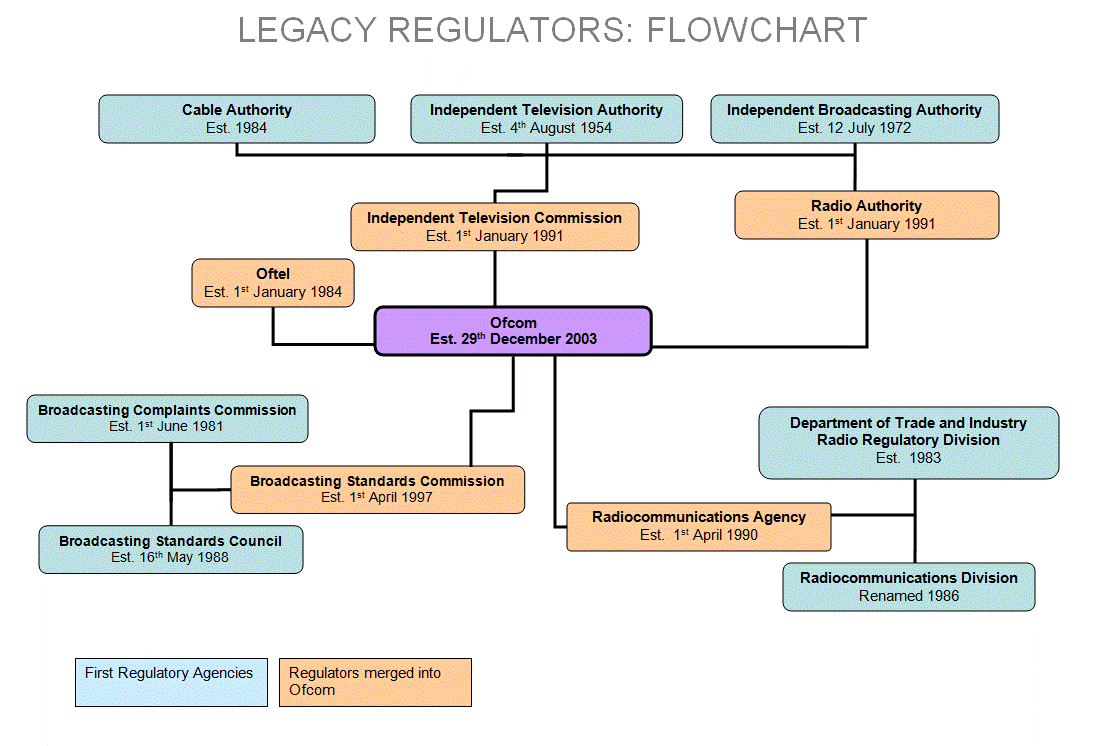
This diagram represents the position at 29 December 2003, when Ofcom was created. It does not include Postcomm, which merged with Ofcom in 2011.
Here is a short history of each of the regulators that Ofcom replaced:
The Radiocommunications Agency (RA) (1991-2003)
The Radiocommunications Agency was an Executive Agency of the Department of the then Trade and Industry, and was responsible for most non-military radio spectrunm matters in the UK. It had about 600 staff and covered all aspects of spectrum management, including international negotiation, spectrum monitoring, regulation, research and licensing.
Its history dates back to 1918, when the Wireless Telegraphy Board was set up to co-ordinate interference problems affecting radio communications in the English Channel. It went through a number of name changes until in 1990 the Radiocommunications Division of the DTI was launched as the Radiocommunications Agency, under the Government’s Next Steps programme.
Oftel (1984-2003)
Oftel, the Office of Telecommunications, was officially created on 1 August 1984, established by the Telecommunications Act 1984. The first Director General of Telecommunications was Professor Bryan Carsberg, appointed in July 1984, who was empowered to appoint staff to manage Oftel. Oftel was a non-ministerial Government department with close historic ties to DTI. It raised the majority of its funds from a levy on telecommunications companies.
The Broadcasting Standards Commission (BSC) (1988-2003)
The BSC was formed from the Broadcasting Standards Council and the Broadcasting Complaints Commission, which merged on 1 April 1997, under the terms of the Broadcasting Act 1996.
The BSC’s remit was to consider broadcasting standards and fairness across all television and radio (the BBC and commercial broadcast services), as well as text, cable, satellite and digital services, and in particular the portrayal of violence, sexual conduct and matters of taste and decency.
Its duties were to draw up and keep under review a code of practice relating to standards and fairness; to consider and adjudicate on complaints; monitor programmes, commission research and report on violence, sex and bad language.
The Independent Television Commission (ITC) (1991-2003)
The Independent Television Commission (ITC) was preceded by the ITA, the Cable Authority and the IBA. It was established by the Broadcasting Act 1990 to license and regulate all commercially-funded television services in the United Kingdom, whether delivered terrestrially, or by cable or satellite. It was a statutory corporation and raised the cost of its expenditure directly from the broadcast television industry. Its functions were derived from the Broadcasting Act 1990 and the Broadcasting Act 1996 - it:
- licensed all commercially-funded television in the UK, whether delivered terrestrially or by cable or satellite, public teletext and certain other text and data services;
- regulated these services through its published licences, codes and guidelines, and had a range of penalties for failure to comply with them;
- had a duty to ensure that a wide range of television services was available throughout the UK and that, taken as a whole, they were of a high quality and appealed to a variety of tastes and interests.
The Radio Authority (1990-2003)
The Radio Authority licensed and regulated the independent radio industry in accordance with the statutory requirements of the Broadcasting Act 1990. It took over these responsibilities from the IBA.
It planned frequencies, awarded licences, regulated programming and radio advertising and played an active role in the discussion andformulation of policies which affected the independent radio industry and its listeners.
The Radio Authority was a statutory corporation which raised the cost of its own expenditure directly from the broadcast radio industry; and raised revenue for the Treasury from holders of national radio licences
The Independent Television Authority (ITA) (1954-1972)
The 1954 Television Act established commercial television and set up the ITA. The ITA was responsible for determining the location, constructing, building, and operating the transmission stations used by the ITV network, as well as determining the franchise areas and awarding the franchises for each regional commercial broadcaster.
The Authority's first Director General was Sir Robert Fraser, appointed on 14 September 1954.
The Cable Authority (1984-1991)
In 1985 the Cable Authority was established by the Cable and Broadcasting Act 1984 to regulate the newly liberalised cable television industry. Its responsibilities were taken over by the new Independent Television Commission on 1 January 1991.
The Authority had two main functions. The first was to grant licences, following a competitive franchising procedure, for the provision of services over the new broadband cable system. The second was the regulation of the programme services carried by cable systems
The Independent Broadcasting Authority (IBA) (1972-1990)
The 1972 Sound Broadcasting Act renamed the Independent Television Authority the Independent Broadcasting Authority, and extended its remit to the supervision of both independent television and independent radio.
The 1973 Independent Broadcasting Authority Act further charged the IBA with the statutory duty to devise and implement a television-style system of controls over radio advertising. During 1990 control of commercial radio broadcasting passed to the Radio Authority, which announced its intention to exert a 'lighter touch' than the IBA had done. By the start of 1991, the IBA had become the Independent Television Commission (ITC),